


인터넷만화방 - 만화/웹툰/소설
3.72.00 Reviews
App Specs
- Version
- 1.2.119
- Updated On
- License
- Free
- Downloads
- 500,000+
- Developer
- (주)한아름닷컴
- Categories
- Comics
- Platform
- Android, iOS
Screenshots





 Analysis by AppCompare
I approach 인터넷만화방 - 만화/웹툰/소설 with one practical question in mind: does a reading app make it easy to find and enjoy stories without asking me to trust it blindly? Its mix of comics, webtoons, and novels is appealing, but a broad catalogue is only part of the decision. I also want to know what choices are visible to readers, where spending may enter the experience, and whether the app suits the way I actually read.
A broad library, with a few trade-offs
This is a free comics app from developer (주)한아름닷컴, with optional in-app purchases priced from $2.49 to $179.99 per item. That range makes it sensible to treat browsing and buying as separate decisions: I would explore first, check the cost attached to a particular item, and spend only when I know what I am getting. Free to install does not mean every story or reading option is free, so I would not assume that a series can be followed from start to finish without a purchase.
The app’s audience is broad in format but not necessarily universal in taste. I would consider it if I like moving between drawn stories and prose, or if I want one place to browse those forms instead of maintaining separate reading apps. If I mainly want a particular publisher’s catalogue, a highly specialized webtoon service may be a better fit; if I want a general ebook library, an ebook-first app may offer a more focused experience. The useful distinction is not simply which app has more titles, but whether its mix matches what I want to read.
Reading with a plan
A practical way to use a mixed-format library is to browse with a specific mood or time window in mind. For a short break, I might look for a comic or webtoon chapter; for a quieter evening, a novel may suit me better. Switching formats can keep reading from feeling repetitive, but it can also make the catalogue feel busy. I would start with one title rather than opening several promising series at once, then return to browsing when I have finished a chapter or reached a natural stopping point.
For a commute, the key question is whether the material I want is ready before I lose a connection. The published article describes an offline reading option, which can be useful when I have a reliable connection beforehand. I would prepare the specific title before leaving, rather than assume every item is available offline or that a download will work after I am already disconnected. That small habit is especially worthwhile for a long ride, where a failed last-minute load can turn a planned reading session into wasted time.
Trust and reader control
Trust is difficult to judge from a catalogue alone. The app has a Teen content rating, so I would still make a title-by-title choice for a younger reader rather than treating the app-wide rating as a promise that every story will suit them. The same applies to personal comfort: a genre label or short description is a useful first check, but I would read the individual synopsis before starting something unfamiliar.
I also pay attention to the moment a reading choice becomes a spending choice. With purchases available at widely different price points, I would pause at each paid prompt, confirm which item the charge covers, and avoid tapping through simply to keep a chapter moving. That is not a claim about a particular checkout design; it is a practical way to keep control when using any app that combines free access with paid content. If someone else uses the same device, I would be especially careful to explain that distinction before handing it over.
Worth Reading Before You Choose

Baby Panda World Brings Quick Play to Modern Phones, but Its Game Library Feels Busy

ESPN’s Live Game View Makes Following Close Games Easier

QuizzLand Review: A Good Fit for Short Trivia Breaks, Not Every Player

Basketball Stars: Multiplayer Is Fast, but Can It Recover When Matches Go Wrong?

WEBTOON Turns Phone Updates Into a Better Reading Routine

Link to Windows Runs on Shared Habits, Not Social Feeds
The app is rated 3.6 on average from around 2,100 ratings, and it has over 500,000 installs. I read those figures as a reason to approach it with measured expectations, not as proof that it will suit my preferences. The current version is 1.2.119 and it requires Android 6.0 or later. It was released on November 12, 2015, so it has been around for a while, but age alone does not tell me whether the current experience will fit a particular phone or reading habit.
The Dive into the Digital Library
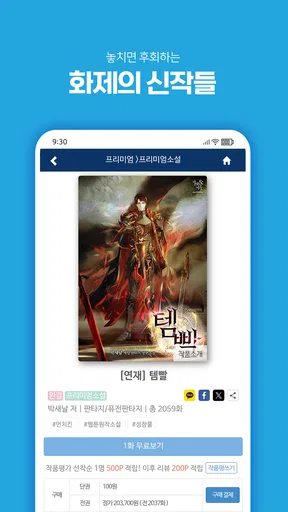
From the moment I opened the app, I was greeted with a sleek and intuitive interface. It’s almost like stepping into a modern library, but with a twist. The homepage is well-organized, featuring a plethora of comics, webtoons, and novels that are neatly categorized. Whether you're into action-packed adventures or heartwarming romances, there's something for everyone.
Browsing is a breeze. You can easily scroll through different genres or use the search function to find something specific. What I really appreciated was the personalized recommendations. It felt like the app understood my tastes, suggesting titles that I might enjoy based on my reading history. It’s a small touch, but it makes a big difference in user experience.
Content Galore
One of the standout features of 인터넷만화방 - 만화/웹툰/소설 is its extensive collection. We're not just talking about a few hundred titles here. The app boasts a vast library, regularly updated with new content. This means that there's always something new to discover, keeping the experience fresh and engaging.
Each title comes with a detailed description and user reviews, which I found super helpful. It’s always nice to get a sneak peek of what to expect before diving into a new series. Plus, the user community seems really active, so you can get a sense of what others are enjoying.
Reading Experience
The reading experience is where this app truly shines. The pages load swiftly, and the text is clear and easy to read. For webtoons, the vertical scrolling is smooth, making it easy to lose yourself in the story. And for novels, the customizable reading settings are a nice touch. You can adjust the font size and background color to suit your preferences, which is great for those late-night reading sessions.
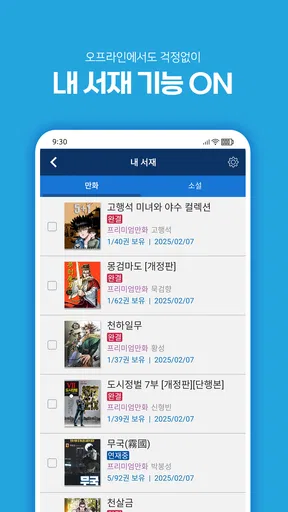
There's also an offline reading option, which is a lifesaver when you're on the go. Simply download your favorite titles, and you can enjoy them without needing an internet connection. Perfect for long commutes or when you're off the grid.
Interactivity and Community
One aspect that I found particularly engaging is the community interaction. Within the app, users can leave comments on each chapter, creating a lively discussion around the content. It’s like being part of a book club, where you can share your thoughts and theories with fellow readers.
Additionally, the app hosts various events and challenges, encouraging users to explore new genres or participate in themed reading marathons. These events are a fun way to engage with the community and discover new favorites.
Final Thoughts
All in all, 인터넷만화방 - 만화/웹툰/소설 offers a comprehensive platform for comic and novel enthusiasts. With its vast collection, user-friendly interface, and engaging community, it provides a robust reading experience that’s hard to beat. Whether you’re a casual reader or a die-hard fan, this app has something to offer.
If you're ready to explore a world of stories and connect with like-minded readers, this app is definitely worth a download. Happy reading!
Who will get the most from it?
I think this app makes the most sense for readers who enjoy exploring rather than arriving with a strict list of titles. A recommendation feed and a catalogue spanning comics, webtoons, and novels can help when I want to find something new but do not yet know what I am in the mood for. The combination is also handy for households or individuals whose reading preferences shift between illustrated chapters and longer prose, though each person should still make their own choices about content and spending.
It is less compelling if I need a particular series that I already follow elsewhere, or if I prefer an app devoted to a single format with tools tailored around it. A specialist webtoon reader may be easier to navigate when nearly all my reading is vertical comics; a conventional ebook app may be preferable when typography, book management, and a familiar reading shelf matter more than serial content. I would treat this as a flexible discovery destination, not an automatic replacement for every reading service I already use.
Small habits that make browsing easier
When I find a title that interests me, I would read its description and a few user comments before committing to a longer run. Comments can reveal how readers respond to a chapter, but they are opinions, not a substitute for the synopsis or a guarantee that I will share their taste. If I am choosing something for a limited break, I would also avoid starting multiple series at once; keeping a short mental list of what I have sampled makes it easier to return to the one that actually held my attention.
Recommendations can be useful, but I would use them as a starting point rather than a verdict about my tastes. If suggestions begin to feel repetitive, searching by genre or entering a title directly gives me a more deliberate route through the library. Conversely, when I have no particular idea, browsing categories is a good way to make discovery the point of the session. These two approaches serve different moods: search is efficient, while browsing is better when I am open to surprise.
For offline reading, I would check the selected work while connected and make sure it is ready before setting out. That is more dependable than waiting until a train or waiting room has poor reception. I would also choose only what I expect to read soon, rather than treating a download as a permanent archive. This keeps the routine simple and avoids confusing access to a prepared item with ownership of every part of a series.
Questions worth settling before a long read
Can I use it without paying? The app is free to install, but paid in-app items are part of the experience, so I would inspect the price attached to a title before continuing. Can I read away from a connection? An offline option is described, but I would prepare the particular content in advance instead of assuming every work can be saved. Is it suitable for a teenager? The app carries a Teen rating, yet I would still check individual titles, especially when choosing for someone else.
What if I want one specific series? I would search for it directly before investing time in recommendations or browsing. A broad library does not guarantee that every reader’s must-have title is present. And what if I do not want comments or community activity? The app’s chapter discussions are an added social layer, but readers who want a quiet, solitary experience can simply focus on reading; those who prefer a completely minimal interface may be more comfortable with a dedicated reader that puts community features out of sight.
A measured recommendation
My recommendation is cautious but positive for readers who value variety and are comfortable checking costs and titles as they go. The strongest reason to try it is the chance to move among comics, webtoons, and novels without limiting discovery to one format. The main reasons to hesitate are equally practical: paid items require attention, a general catalogue may not beat a specialist app for a favorite format, and an app-wide age label does not replace checking a particular story.
I would install it when I want a fresh place to browse and keep my first session low-commitment: search for one promising title, read its description, sample it, and decide whether the experience suits me before spending or building a large reading queue. If that kind of flexible discovery is what I want, 인터넷만화방 is worth considering. If I need a narrowly curated collection or want a reading app with no paid-content decisions, I would choose a more focused alternative instead.
Pros
- Vast library of comics and webtoons.
- User-friendly interface for easy navigation.
- Regular updates with new content.
- Offline reading available.
- Customizable reading settings.
Cons
- Ads can be intrusive at times.
- Limited free content without subscription.
- Requires a stable internet for streaming.
- Some content may not be translated.
- In-app purchases can add up.
FAQs for 인터넷만화방 - 만화/웹툰/소설
What is 인터넷만화방, and what kind of content does it offer?
인터넷만화방 is a digital platform that provides a wide range of comic books, webtoons, and novels. It caters to Korean audiences looking for a variety of genres, including romance, action, fantasy, and drama. The app is designed to offer a seamless reading experience, with easy navigation and regular updates.
Is 인터넷만화방 available for both Android and iOS devices?
Yes, 인터넷만화방 is available for both Android and iOS platforms. Users can download the app from the Google Play Store or the Apple App Store, ensuring compatibility with a wide range of devices. Regular updates keep it optimized for the latest OS versions.
Does 인터넷만화방 require a subscription or is it free to use?
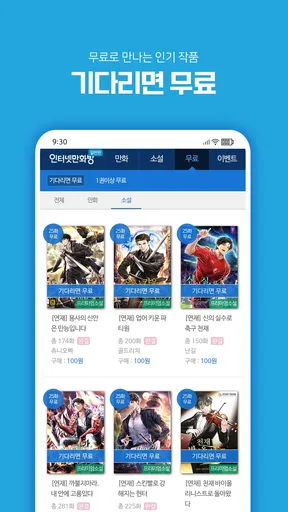
인터넷만화방 offers both free and premium content. While users can access a variety of comics and webtoons for free, subscribing to the premium service unlocks exclusive content, ad-free reading, and early access to new releases. Subscription details and pricing can be found within the app.
How often is new content added to 인터넷만화방?
New content on 인터넷만화방 is added regularly, ensuring users have access to the latest chapters and series. The app frequently updates its library with new releases and popular titles, keeping readers engaged and coming back for more. Notifications can be enabled for specific updates.
Can I download content from 인터넷만화방 for offline reading?
Yes, 인터넷만화방 allows users to download content for offline reading. This feature is particularly useful for users who want to enjoy their favorite comics and novels without needing a constant internet connection. Downloaded content is accessible through the app's library section.


